
Description
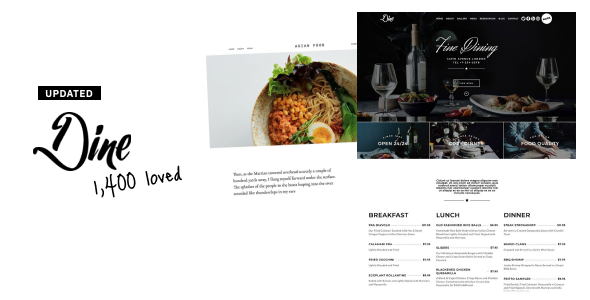
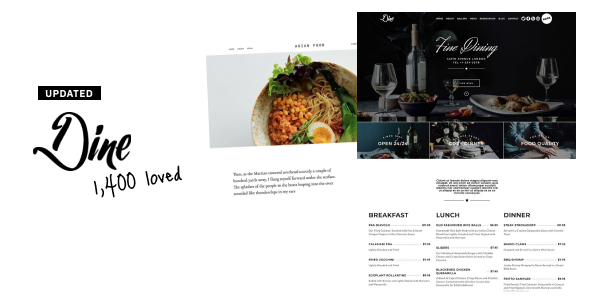
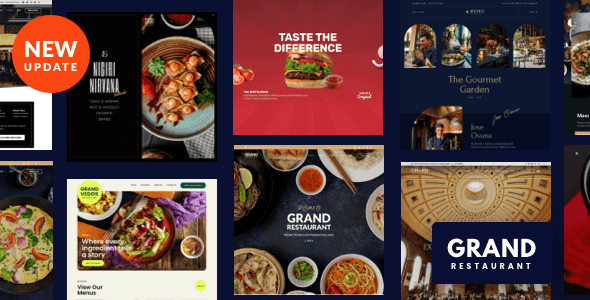
Dine is the ultimate restaurant solution for WordPress, perfect for a variety of establishments including restaurants, bars, pubs, bakeries, pizzerias, cafés, bistros, and coffee shops. With stunning prebuilt templates, you can effortlessly create a sophisticated and stylish restaurant website. Enjoy an array of features such as online ordering, reservations, beautiful galleries, and engaging menus that will captivate your customers.
- Live demo: dine.heronwp.com
- Online docs: heronwp.com/docs/dine
- Support: heronwp.com/support

Elementor + 20 addons
Dine employs Elementor as its page builder, ensuring a seamless experience whether you’re a newcomer or an experienced user of page builders. With Dine, you gain access to specialized elements designed specifically for restaurant sites such as Food Menu, Gallery, Booking, Forms, Navigation, and more—without needing Elementor Pro.

Reservation & Booking
Dine integrates the powerful Restaurant Reservations plugin, allowing you to add a customizable reservation form directly on your site. Manage your customer list effortlessly from your WordPress dashboard—no need to rely on external booking services like OpenTable. Explore the reservation form here.

Online Ordering with WooCommerce
Selling online has never been easier! Dine seamlessly integrates with WooCommerce, allowing you to utilize stunning prebuilt shop demos tailored for pizzas, burgers, delivery, and more. Start selling your items right away with no additional costs—WooCommerce is entirely free! Check out a sample shop.

Beautiful Menu & Built-In Gallery
Create captivating menus with the Dine food menu addon, offering flexibility in layout—choose from 1, 2, or 3 columns with item names, descriptions, prices, and images. With the gallery addon, present your dishes in a stunning grid or metro layout, complete with lightbox functionality. View a sample menu | Explore the gallery.

Powerful Theme Options
Dine comes packed with over 1,500 customizable theme options, enabling you to tailor every aspect of your website—headers, footers, backgrounds, typography, and color designs—all in real-time using the WordPress Customizer.

Easy Demo Import
Starting your journey is hassle-free! Simply select any prebuilt demo from the backend, click once, wait a few minutes, and your site will mirror the demo perfectly. It’s 100% guaranteed, or your money back.

Features
- WordPress 7.x compatible, ensuring smooth operation with the latest updates
- PHP 7, 8 compatibility
- Built with Elementor, paired with 20 exclusive Dine addons—no Elementor Pro required.
- 3 unique prebuilt demos, all easily importable with one click
- Dynamic food menu: configure with 1, 2, or 3 columns, featuring detailed item descriptions and images
- Complete reservation management with Restaurant Reservations for streamlined bookings
- Online shop integration using WooCommerce
- Stunning gallery: choose from grid or metro layouts with a lightbox for immersive viewing
- Vast Elementor template library: instantly implement styles into your pages
- Header & footer customization: design them with Elementor for ultimate flexibility
- 1,500+ options: complete typography and color control from the Customizer—one click to change accent colors.
- Total typography control: utilize Google Fonts, upload custom fonts, or use system fonts.
- Smooth parallax effect: enjoy 60fps performance with modern techniques
- Responsive design: perfectly adapts to any mobile device
- Retina-ready: immaculate resolution on high-definition screens
- SEO optimized: utilizes HTML5 & CSS3 for better visibility
- Flexible site layouts: choose between wide or boxed formats
- Diverse blog layouts: present content in standard, grid, or list formats
- Side navigation: intuitive navigation dots enhance user experience
- Support for transparent and sticky headers
- Multilingual-ready: compatible with Polylang and WPML
- Translation-ready: includes *.pot file, adaptable with translation plugins
- Extensive plugin support: works seamlessly with essential plugins like Contact Form 7 and others
- Clean code and child theme included for easy modifications
- GDPR compliant: no data collection of any kind
- Lifetime updates: receive free updates post-purchase, with no subscription fees
- Well documented: find thorough guidance at heronwp.com/docs/dine
FAQs
What’s included with my purchase of Dine?
Your purchase includes the dine.zip WordPress theme file, all necessary Elementor addons, access to current and future demos at no extra cost, lifetime updates, and top-notch support.
Are there any recurring fees?
No, Dine comes with a one-time purchase fee, meaning no recurring license fees or extra charges for future updates, features, or demos.
What if I run into a problem with the theme?
Post-purchase, you’ll have access to dedicated support from the theme author, who has over a decade of WordPress experience. Quick, concise answers will solve your problems—no long threads of unhelpful replies.
Do I need Elementor Pro?
No, you won’t need Elementor Pro. Dine includes all necessary Elementor addons to build beautiful pages.
Can I use a feature from one demo in another demo?
Absolutely! All demos offer variations of features, layouts, or styles that you can mix and match to create your own unique design.
Credits
Icons and fonts: Font Awesome and Google Fonts.
Scripts: Flickity, Jarallax, imagesLoaded, Magnific Popup, FitVids.js, ScrollMagic, Waypoints, Tipsy, Superfish and Modernizr.
Images displayed on demo sites are for illustration purposes only and are not included with the theme.
Support
For assistance, visit our support desk: heronwp.com/support



Reviews
There are no reviews yet.